
Uncategorized
The Ultimate Guide to Herman Miller Lumbar Support Chairs: Pain-Free Seating for Work and Gaming
Sep
Sitting for extended hours in a standard office chair can take a severe toll on your spine. Lower back strain, fatigue, and poor posture are common complaints among knowledge workers and gamers alike. If you are struggling with lower back discomfort, investing in a high-performance Herman Miller lumbar support chair can revolutionize your daily seating experience.
In this comprehensive guide, we will explore why Herman Miller is the gold standard for ergonomic lower back support, evaluate top models like the Aeron and Embody, and share practical setup tips to help you maintain optimal posture.
Why Is Lumbar Support Essential for Long Hours?
When you sit down, your spine naturally wants to flatten or slump, flattening the natural inner curve of your lower back (the lumbar region). Over time, this poor alignment places excessive pressure on your spinal discs, surrounding muscles, and spinal ligaments.
An ergonomic chair with dynamic lumbar support solves this issue by supporting the sacrum and lumbar spine. Proper support delivers significant physical benefits:
- Relieves Disc Pressure: Keeps your lumbar curve naturally aligned, reducing tension on lower back discs.
- Encourages Active Posture: Stops slouching before it begins, keeping your shoulders open and thorax upright.
- Reduces Muscle Strain: Prevents the lower back muscles from working overtime to keep you upright.
- Improves Circulation: Promotes healthy blood flow through your lower body during deep focus sessions.
Top Herman Miller Chairs with Advanced Lumbar Support
Herman Miller has pioneered ergonomic research for decades. Rather than offering basic cushion padding, their chairs utilize biomechanical technology tailored to individual body shapes.
1. Herman Miller Aeron Chair (PostureFit SL)
The Aeron is arguably the most famous ergonomic office chair in the world. Its signature PostureFit SL technology features two individual pads that stabilize the base of your spine (the sacrum) while supporting the lumbar curve simultaneously.
- Key Lumbar Feature: Dual-pad PostureFit SL with adjustable depth.
- Best For: Users who prefer firm, breathable mesh support that targets specific pressure zones.
2. Herman Miller x Logitech G Embody Chair
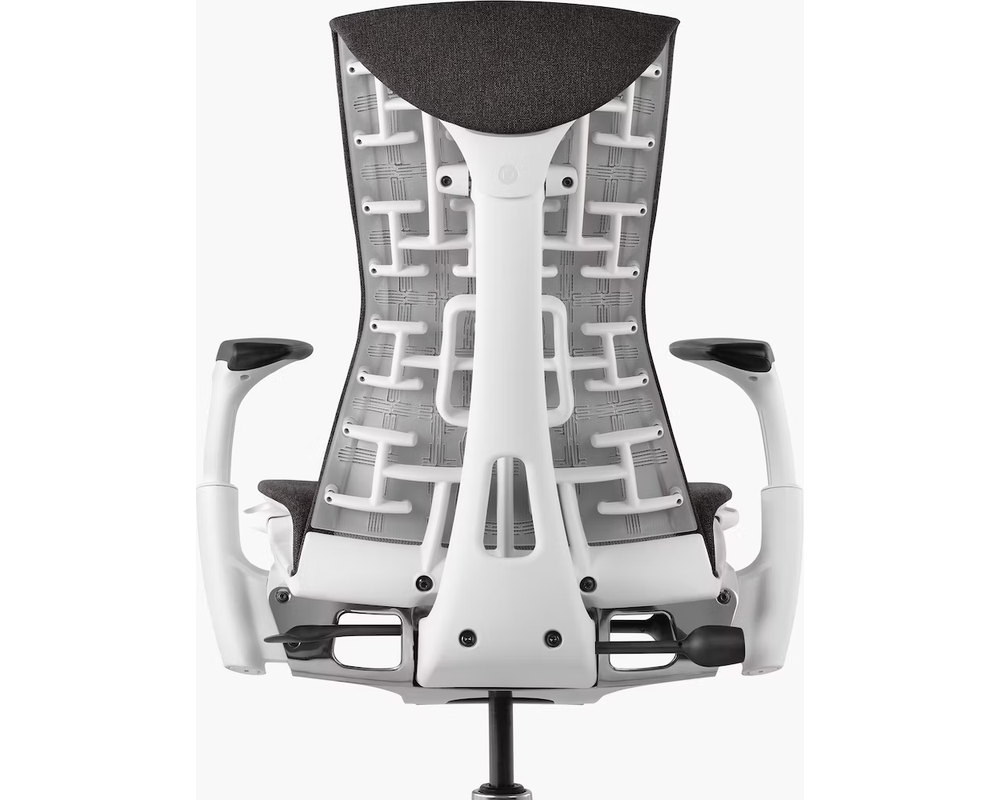
Designed specifically for long, intensive sitting sessions, the Logitech Embody features a revolutionary BackFit adjustment mechanism. Rather than a localized cushion, the entire backrest functions like a human spine, adapting automatically as you micro-move throughout the day.
If you want to read detailed performance comparisons and user reviews of this hybrid design, check out hermanlogitech.com for in-depth insights on ergonomic gaming setups.
- Key Lumbar Feature: Dynamic pixelated matrix that distributes pressure across your entire spine.
- Best For: Anyone seeking continuous, adaptive lower back support during gaming or heavy multitasking.
Key Ergonomic Features to Look For
When selecting a Herman Miller lumbar chair, pay close attention to these critical adjustability factors:
| Feature | Primary Function | Ideal Configuration |
| Lumbar Height | Targets the exact curve of your lower back | Positioned right above your belt line |
| Lumbar Depth / Tension | Controls firm vs. gentle push on the spine | Adjusted until your back feels supported, not pushed forward |
| Tilt Tension & Limiter | Balances recline resistance | Allows effortless micro-movement without collapse |
| Fully Adjustable Arms | Keeps shoulders and neck relaxed | Elbows resting at a 90-degree angle |
You can research clinical ergonomic studies on back health and sitting posture on Google to understand how biomechanical alignment impacts long-term spinal health.
How to Properly Set Up Your Herman Miller Lumbar Support
Buying an elite ergonomic chair is only half the battle—you must also dial in the adjustments to fit your physique. Follow these core steps to dial in your seating position:
- Adjust Chair Height: Set your seat height so your feet rest flat on the floor with your knees at a 90-degree angle.
- Engage the Lumbar Support: Sit all the way back against the backrest. Dial the PostureFit SL or BackFit mechanism until you feel gentle, continuous firmness in your lower lumbar region.
- Set the Recline Tension: Adjust the tilt tension so the backrest supports you upright when typing, yet lets you recline gently when leaning back to think.
- Position Monitor and Desk: Ensure your eye level aligns with the top third of your computer screen to avoid neck tilt.
Is a Herman Miller Chair Worth It?
If you suffer from chronic lower back discomfort or sit for more than six hours a day, a Herman Miller lumbar support chair is a worthwhile investment in your health and daily productivity. By pairing advanced sacral support with durable build quality, these chairs protect your spine and maintain energy levels throughout your workday.
